
Planning a kid's birthday party is a lot of small questions. How much is it, really? How many kids fit? How long do we get the room? Does it include food? And the answers are almost never on one page.
Parents also plan in two very different ways. Some want a spreadsheet. Some want to wander until something feels right. We heard both, so the new party finder does both.
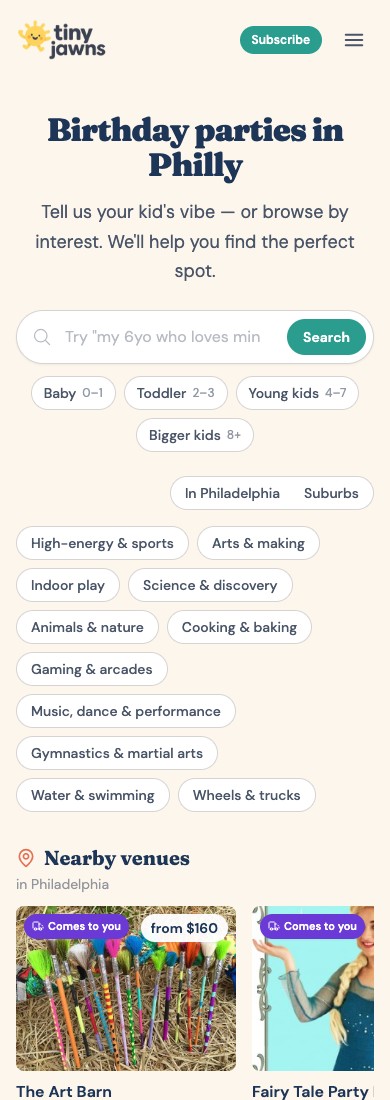
What was wrong with the old page
The old birthday page showed venues in rows, one theme per row: High-energy and sports, Arts and making, Animals and nature, and on down the page. Before you saw a single venue, there were 17 pills to get past: 4 for your child's age, 2 for area (In Philadelphia or Suburbs), and 11 for interests. Then it kept going. On a phone the page was about 9,250 pixels tall, roughly 11 screens of scrolling, with up to 19 rows of cards. Finding a venue meant scrolling past a lot of ones you did not want.
Comparing was harder. To see two places side by side, you opened both. A card gave you a photo and a from-price, but not how long the party lasted, how many kids fit, or what was included. And to look inside one theme, you went to a separate page and lost the rest.
Real prices first
The new finder is built around the package, not just the place. Right now it lists 1,043 priced party packages from 402 places in the Philadelphia area. Each one shows what it costs, how many kids it holds, how long it runs, the ages it fits, and what is included, along with the date we last checked the price.
If a place does not publish a price, we say so. Never a guess in the price box.
For the planner: a table
If you are the parent with a spreadsheet already open, switch the finder from Cards to Table. Every place is a row. Every fact is a column:
- Category, area, and distance from your ZIP
- Starting price, and your price for your group size
- Capacity and length of the party
- Ages
- What is included
- When the price was last checked
Sort by any column: price, capacity, how long you get. Scan fifty options in a couple of minutes.
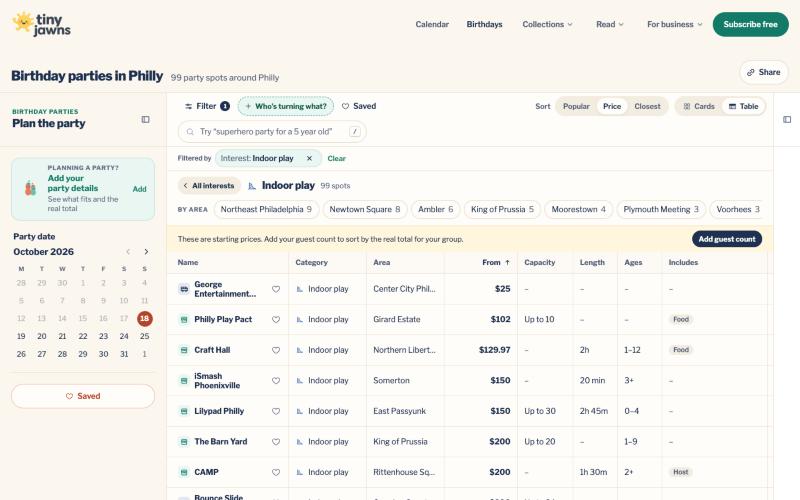
You set the filters yourself. Tell the finder how old your kid is turning, how many kids are coming, your ZIP and how far you will drive, and your budget, as a total or per kid. Narrow by area, by what is included, or by type of party. Once it knows your group size, the table shows what each place would cost for your party, and flags places that do not fit.
For the browser: cards
Maybe you do not know what you want yet. That is fine. The card view shows photos, a category color and the starting price. Browse by interest: indoor play, arts and making, animals, science, water, and more. Tap a place to see its packages, what is included, and a map.
Or just type what you are picturing. Something like "superhero party for 12 kids". The finder turns your words into filters, shows you what it understood, and lets you remove any part that is not right.
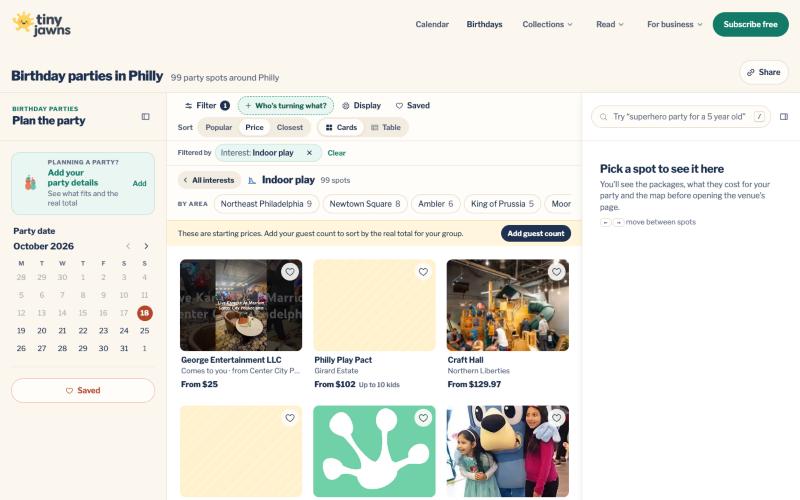
Save the ones you like with the heart, and come back to them later. They stay on your device.
Why we built it this way
Trust. Every price has a source and a checked date. If we do not have a number, we say so.
Time. You should not need ten tabs. Sort, filter, compare, and decide.
Your party details, like your child's age, guest count and ZIP, stay private to you.
Keep reading: the new TinyJawns calendar, and the TinyJawns app, which keeps your saved party finder available offline.
Made in Philly, for Philly parents.