
Most weeks, planning something to do with your kids goes like this. You open four tabs. One event says Saturday, another says Sunday. One has no address. One ended last month and nobody took it down. By the time you have a plan, the morning is half gone.
That is the problem we built the new calendar to fix. Not "more events." Less of your time.
Why we rebuilt it
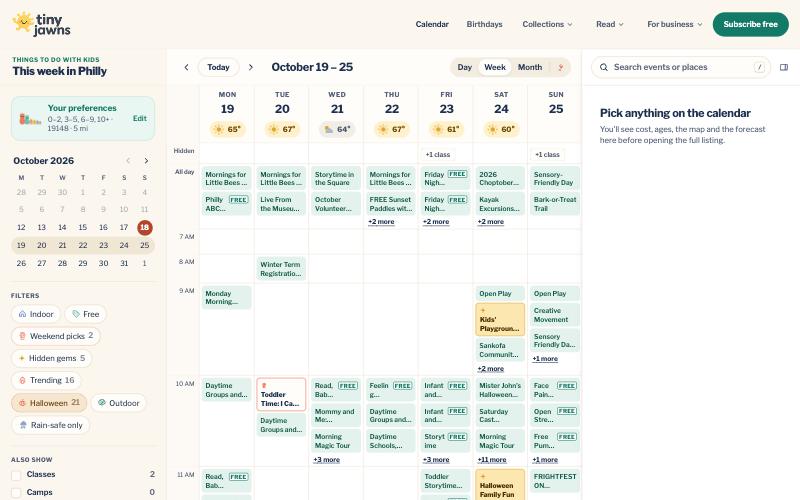
We built the calendar from the ground up, over a few months of trying different ideas. In early May we tried a redesign built around editorial cards, with a top pick up front. We kept it behind a preview link while the original page stayed the default. It looked good. It was not good enough at the thing parents needed most: managing their time.
It was too much of a magazine. A magazine is nice to browse. It is not the fastest way to find out what your four-year-old can do on Saturday. So we kept asking one question: what gets a parent from "what is on?" to "we are going" in the least time?
The answer was already on your phone. The thing you use every day to run your family's week is a calendar. So that is what we built: days and times you can read at a glance, the way your own calendar works, filled with things to do with your kids.
It went live on October 8 at tinyjawns.com/calendar, and the old Explore link now brings you here.
Time is the point
TinyJawns stands on three things: your time, trust, and community. For the calendar, the first one decides almost every choice. Here is what that looks like.
It opens on today
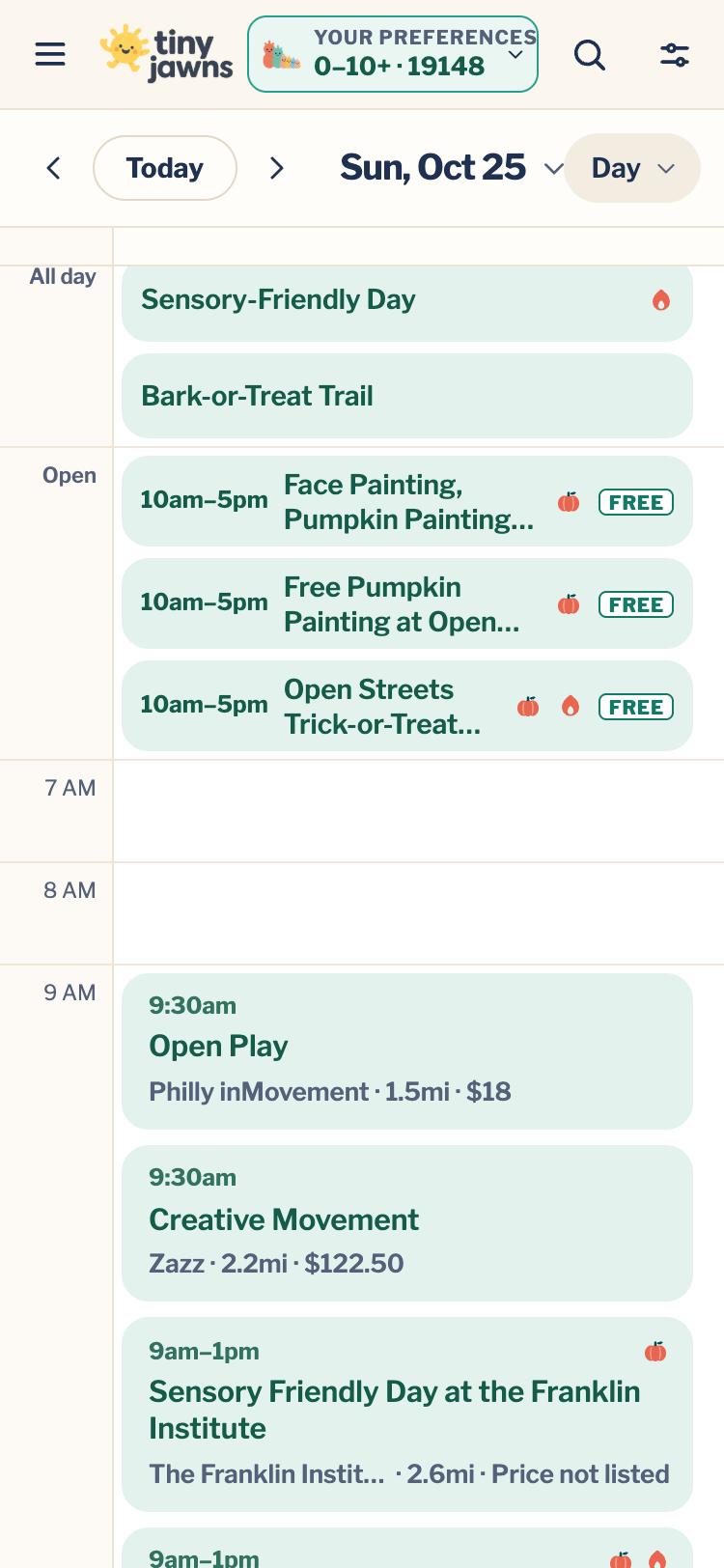
The calendar opens on the day view, not a month grid. You came to find out what is on today or this weekend, so that is the first thing you see. Swipe sideways to move between days. Switch to week, weekend or month when you want to look further ahead.
A swipe that feels like your phone's calendar
Small things decide whether something feels like an app or like a web page. We spent the better part of two weeks on one of them: swiping between days.
We compared it side by side with the calendar apps you already use, and went back and forth more times than we would like to admit. A quick flick carries you to the next day the way you expect. A slow drag lets you peek and change your mind. The next day is already there when you land, never a blank screen, and you stay at the same hour you were looking at. It moves enough to feel natural and no more. If your phone is set to reduce motion, it simply steps from day to day.
Preferences: drop straight into what matters to your family
Tell the calendar your kids' ages and your ZIP code one time. After that it remembers, and you land on what fits your family instead of starting from everything. There is a "Just for their age" switch too, which keeps the list to things made for the ages you picked. Those choices stay on your own device. We do not keep a profile of your family.
It feels like an app, because you can make it one
On your phone you can add TinyJawns to your home screen. It opens full screen, like any other app, and you can pick the icon you want to see there. Once you have opened it, the calendar still opens when you have no signal, which helps at the park or in the car.
Built for how parents actually plan
Plans change. So the calendar does a few small things on purpose:
- Weather is right there, and it does something. The forecast sits next to each day. When rain is coming, the calendar offers to hide the outdoor plans for those hours, so you are left with things you can actually do. There is also a "Rain-safe only" filter for the whole day.
- Ended events are dimmed. If it already happened today, it fades. It does not sit there looking like an option.
- Seasons show up. Tap Halloween and the calendar dresses for it, with the best picks first. Other holidays get the same treatment as they come around.
It keeps itself up to date
Events change. A class gets cancelled, a festival sells out, a time moves. The calendar is connected to our activities engine, which keeps watching for those changes. When something changes, your calendar changes with it: cancelled and sold-out events are marked, and events that are no longer happening come off. You do not have to refresh anything or check back with the organizer.
Community: hidden gems
Some of the best mornings are the ones you would not have picked yourself. A cleanup day at the neighborhood playground. A shop's one-time kids' workshop. A small festival on a block you have driven past a hundred times.
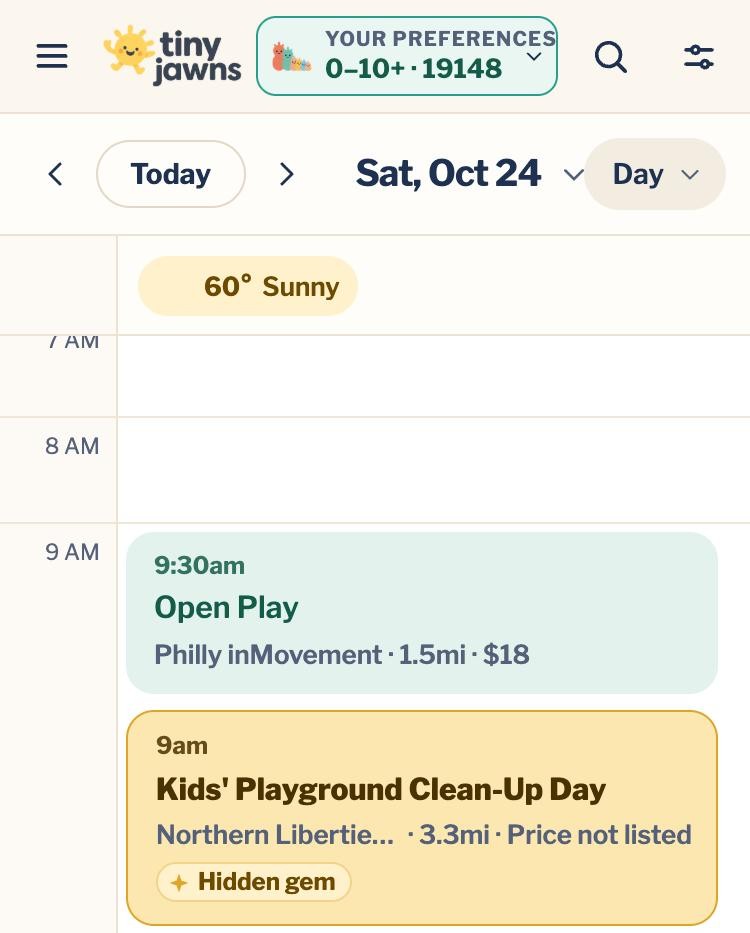
That is what the yellow Hidden gem tag is for. Our hidden-gems algorithm finds events that may be outside what you usually do, but where you will meet people in your own community and see what local businesses put on for special occasions. Tap the Hidden gems filter to see just those.
Trust: what we leave off, and why
A calendar is only useful if you can act on it. If an event has no confirmed address, you cannot get there. If we are not sure the date is right, you might show up on the wrong day. A listing with a guess in it wastes your Saturday.
So every event has to clear a bar before it appears. We need to be able to say where it happens, and we need to be confident the details are right. If we cannot, we hold it back. Missing is better than guessed.
Here is what that looks like for the next 30 days, in mid-October:
- 1,856 upcoming events we found
- 1,223 shown on the calendar
- 633 held back
Of the 633 we hold back:
- 277 did not meet our confidence bar. We are not sure enough about the date, time or details.
- 356 have no location we could confirm. If we cannot tell you where it is, we will not guess.
Those numbers move every day. Some events get confirmed and appear. Others drop off. We check, and we keep checking: in the last 24 hours we re-checked 2,139 listings from 428 local organizers across 84 Philadelphia neighborhoods.
If it is on the calendar, we have a place for it and a date we believe. If it is not, it is not there yet. We would rather show you fewer things than send you somewhere that is not real.
What is next

Since 2024 we have been finding, checking and organizing what is on for Philly families. We are putting everything we have learned into something more personal, for parents who want to spend even less time planning. Its name is Yomi: a personal family calendar app that plans around your kids and lives in the calendar you already use.
That is about all we will say for now. We do not expect to release it for at least a couple of months, while a small group of beta families helps us get it right.
The free calendar is not going anywhere. Tell us what is missing or wrong with the Report a problem link on the calendar, and it goes straight to us.
Keep reading: put TinyJawns on your home screen, and how we rebuilt the birthday party finder.
Made in Philly, for Philly parents.